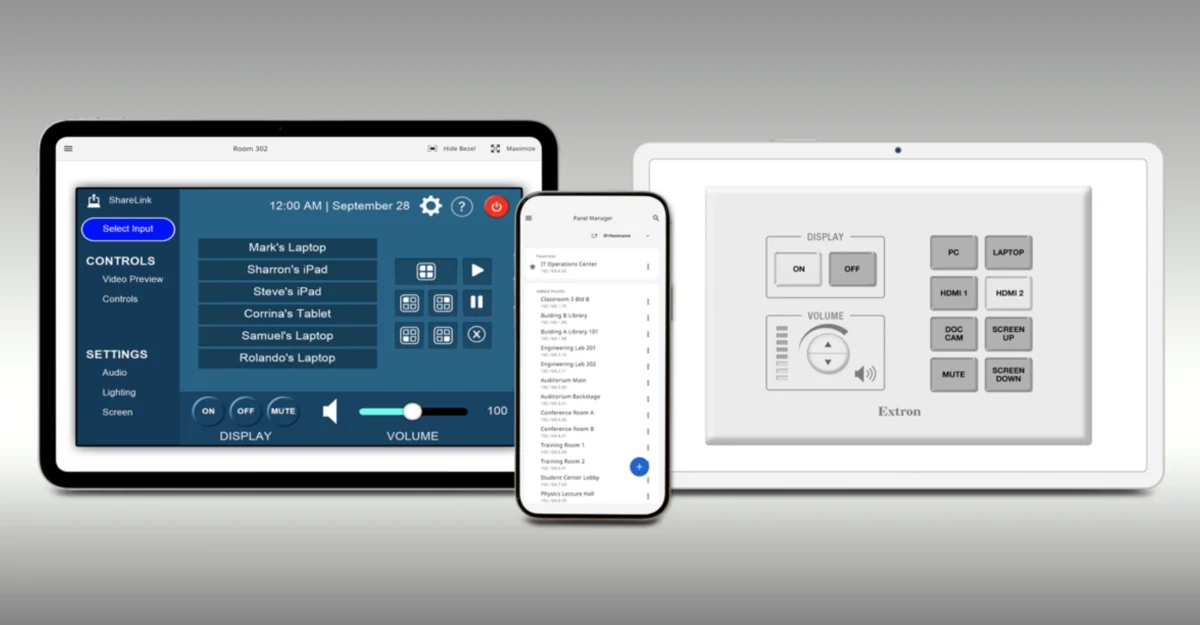
LEESBURG, Va. — In an era where audiovisual integration demands both high security and unprecedented flexibility, Extron has officially announced the launch of Extron Control Pro. Designed to bridge the gap between dedicated hardware control panels and everyday personal electronics, this advanced mobile AV control application is engineered for both Apple iOS and Android devices.
Extron Control Pro builds extensively upon the foundational architecture of the company’s widely adopted legacy Extron Control platform. However, it introduces a robust suite of heavily requested features tailored to the modern systems integrator and corporate IT administrator. Among its flagship additions are real-time dynamic image previews, bulk system uploads capable of being executed entirely offline, and significantly expanded user authentication protocols.
Available immediately for download via the Apple App Store and Google Play, Extron Control Pro aims to redefine how users interact with complex AV ecosystems across single-room installations, corporate campuses, higher education facilities, and large-scale multi-zone commercial venues.
Main Facts: What is Extron Control Pro?
At its core, Extron Control Pro functions as a universal software interface that mirrors the bespoke user interfaces typically found on dedicated Extron touchpanels and button controllers. Once an initial setup configuration is completed by an AV technician or system programmer, end-users can seamlessly connect to any configured room and load identical control layouts without requiring additional on-site configuration, coding, or redundant programming.
The application’s key technical features and operational highlights include:
- Cross-Platform Compatibility: Fully supported on both Apple iOS and Android mobile ecosystems, accommodating smartphones and tablets used by diverse workforces and facility managers.
- Real-Time Dynamic Image Preview: Allows users to view live graphical updates and status representations of system states directly within the control application interface.
- Offline Bulk System Uploads: System integrators and IT administrators can stage, prepare, and upload configuration files for multiple systems simultaneously—even without an active network connection, streamlining large-scale deployments.
- Advanced Authentication Options: Integrates heightened security measures to ensure that only authorized personnel can access sensitive facility AV systems, meeting stringent corporate IT compliance frameworks.
- Seamless Multi-Device Synchronization: When multiple mobile devices or control interfaces are active within the same space, button presses and state changes remain perfectly synchronized in real-time, preventing conflicting commands.
- Primary Control Capability: When paired with an IPCP Pro xi series control processor utilizing Extron LinkLicense for User Interfaces, the app can serve as the primary, standalone control interface for a room, offering a cost-effective alternative to dedicated hardware panels without sacrificing full feature parity.
Chronology: The Evolution of Extron Control Architecture
To understand the strategic significance of the Extron Control Pro release, it is helpful to examine the evolutionary timeline of Extron’s control ecosystem and its movement toward software-defined AV management.
The Shift Toward Mobile Integration (Early 2010s)
As tablet computers and smartphones began penetrating the enterprise market, the AV industry faced a growing demand to unchain users from stationary wall-mounted touchpanels or podium control surfaces. Extron initially responded by introducing software applications that allowed personal mobile devices to interface with proprietary control processors. These early iterations laid the groundwork for remote troubleshooting and basic wireless room control, though they often required complex individual device licensing and manual configuration profiles.

The Rise of IP Link Pro and LinkLicense (Mid-to-Late 2010s)
Extron revolutionized its hardware and software synergy with the introduction of the IP Link Pro control processor lineup, followed closely by the rollout of LinkLicense. This licensing framework fundamentally changed how user interfaces were deployed. Instead of purchasing rigid, hardware-locked GUI panels for every application, integrators could deploy flexible user interfaces across standard mobile hardware, dramatically reducing hardware overhead for commercial clients while standardizing the user experience.
The Demand for Enterprise-Scale Efficiency (2020–2025)
As hybrid work models, flexible meeting spaces, and multi-use corporate campuses exploded in popularity, enterprise IT and AV departments encountered new logistical hurdles. Deploying and maintaining hundreds of individual room controllers became an administrative bottleneck. Facility managers increasingly voiced the need for offline staging capabilities, faster bulk provisioning tools, and tighter integration with corporate identity management and security protocols.
The Launch of Extron Control Pro (September 2026)
Culminating years of field research, customer feedback, and software engineering, Extron officially introduced Extron Control Pro on September 18, 2026. Designed specifically to resolve the scalability and security bottlenecks of previous generations, the new platform integrates real-time dynamic previews, offline bulk uploading, and enterprise-grade authentication into a singular, unified application available on both major mobile platforms.
Supporting Data and Technical Architecture
The technical strength of Extron Control Pro relies heavily on its integration with Extron’s broader ecosystem of hardware processors and software licensing models.
Processor Compatibility and Hardware Synergy
Extron Control Pro is optimized to work hand-in-hand with the IPCP Pro xi series of control processors. These processors, known for their high-performance processing power and advanced security features, act as the central nervous system for modern AV environments.
When an IPCP Pro xi processor is combined with Extron LinkLicense for User Interfaces, the mobile device running Extron Control Pro transforms from a secondary convenience tool into a fully capable primary control interface. This grants system designers the flexibility to eliminate dedicated tabletop touchpanels in rooms where budget constraints, architectural aesthetics, or user preferences favor bring-your-own-device (BYOD) or corporate-issued mobile hardware.
Network Efficiency and Security Protocols
Enterprise networks require rigorous oversight, and AV control traffic is no exception. Extron Control Pro addresses these concerns through robust security implementations:

- Encrypted Communications: All control data transmitted between the mobile device and the IPCP Pro xi processor utilizes secure communication protocols to prevent interception or unauthorized eavesdropping.
- Granular Authentication: By incorporating advanced authentication options, administrators can align mobile access privileges with organizational directories, ensuring that temporary visitors, standard employees, and high-level administrators see only the control interfaces relevant to their permissions.
- Bandwidth Optimization: The app’s underlying architecture is designed to minimize network overhead, ensuring swift response times even when managing multiple concurrent rooms over Wi-Fi networks.
Official Responses and Industry Perspective
Company leadership has emphasized that Extron Control Pro is a direct response to the evolving needs of AV integrators, IT managers, and end-users operating in fast-paced commercial environments.
"Extron Control Pro builds on our popular Extron Control app by adding heavily requested features such as dynamic image preview, bulk system uploads even while offline, and more options for authentication," stated Casey Hall, Chief Marketing Officer for Extron.
Hall further elaborated on the core philosophy driving the product’s development: "This app extends the power and simplicity of our control systems to the mobile devices customers use every day. With quick deployment, automatic loading of familiar interfaces, and support for both iOS and Android devices, Extron Control Pro delivers a consistent, responsive experience from virtually anywhere in a facility."
Industry analysts and AV integration professionals have noted that the inclusion of offline bulk system uploads is perhaps the most operationally significant feature for large-scale deployments. Historically, configuring dozens or hundreds of distinct control instances required technicians to connect each device individually to the local network during commissioning—a time-consuming process vulnerable to network drops and IP configuration errors. By enabling offline staging and bulk provisioning, Extron has drastically reduced the labor hours required to commission complex multi-room rollouts.
Implications for the AV Integration and IT Industries
The release of Extron Control Pro carries profound implications across multiple facets of the commercial AV and enterprise IT sectors.
1. Bridging the AV/IT Convergence Divide
For years, the convergence of audiovisual systems onto corporate IP networks has forced AV integrators to become fluent in networking security, while compelling IT departments to understand the unique latency and reliability demands of real-time media control. Extron Control Pro’s advanced authentication options and secure communication protocols represent a major step toward satisfying corporate IT security mandates without sacrificing the intuitive, tactile responsiveness expected from professional AV systems.
2. Cost Optimization and Design Flexibility
By enabling mobile devices to function as primary control interfaces when paired with LinkLicense, system designers can offer clients tiered budgeting options. In spaces where dedicated touchpanels might be vulnerable to damage, theft, or unnecessary expense (such as multi-use breakout rooms, university lecture halls, or casual collaboration spaces), facility managers can rely on user-owned or facility-managed smartphones and tablets. This reduces hardware expenditures while retaining full system functionality.

3. Streamlining Commissioning and Maintenance Workflows
Time is one of the most valuable commodities in commercial construction and systems integration. The ability to perform bulk system uploads while offline empowers integrators to pre-configure entire facility profiles in a workshop or office setting before stepping onto a job site. Once deployed, real-time dynamic image previews allow support technicians to troubleshoot interface responsiveness and verify system states remotely or from anywhere within the facility, minimizing mean-time-to-repair (MTTR) for critical AV infrastructure.
4. Broadening Accessibility Across Mobile Ecosystems
By maintaining strict parity across both Apple iOS and Android operating systems, Extron ensures that organizations are not restricted by corporate device procurement policies. Whether a company issues iPhones, iPads, Android smartphones, or Galaxy tablets, the user experience remains uniform, predictable, and exceptionally responsive.
Conclusion
Extron Control Pro represents a mature evolution in mobile AV control technology. By marrying the familiar, intuitive interfaces of dedicated Extron control products with the ubiquitous nature of modern smartphones and tablets, Extron has delivered a powerful tool for enterprise environments.
With its focus on security, offline staging efficiency, real-time feedback through dynamic image previews, and cross-platform versatility, Extron Control Pro is poised to become a staple application for AV integrators and IT administrators seeking to deliver seamless, scalable, and secure control experiences across facilities of any size.
Extron Control Pro is available now as a free download on the Apple App Store and Google Play, with full deployment enabled via Extron IPCP Pro xi control processors and LinkLicense for User Interfaces.