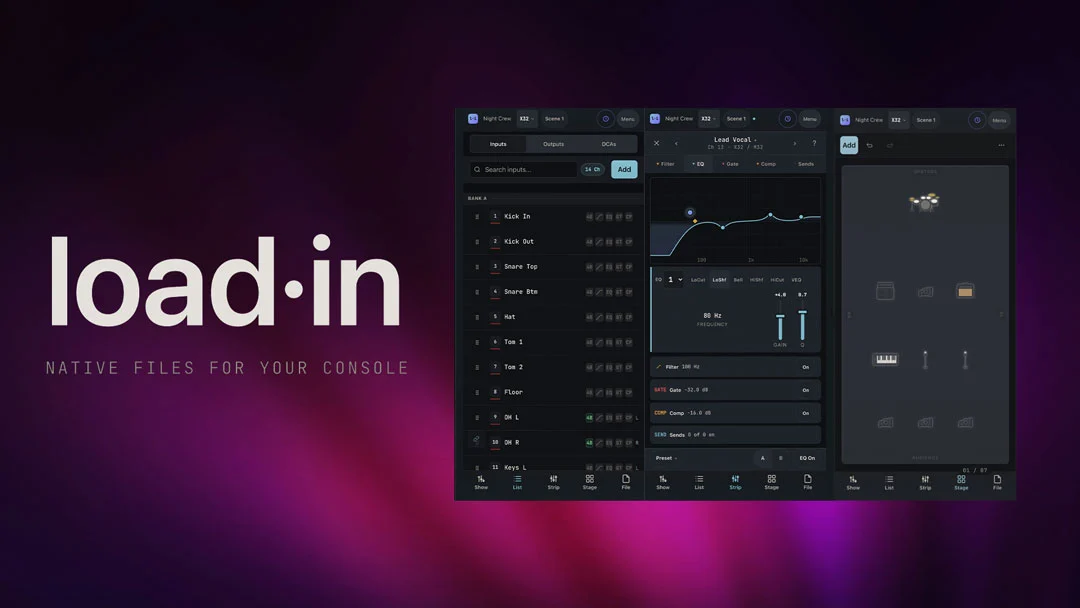
New York, NY (October 2, 2026) — In the high-pressure environment of live touring, the difference between a seamless soundcheck and a logistical nightmare often comes down to preparation. Touring engineer Gryphon Graham has officially unveiled Load-In, a sophisticated software ecosystem designed to bridge the gap between initial show planning and the final, minute-to-minute execution of a live mix. By automating the tedious translation of input lists into native console files, Load-In promises to save engineers hours of manual data entry while minimizing the human error that frequently haunts professional audio production.
Available as both a streamlined iOS application and a browser-based platform, Load-In acts as a centralized brain for stage management, allowing users to build stage plots and labeled input lists from disparate sources—ranging from formal riders and spreadsheets to simple photographs of scribbled notes—and export them as ready-to-load files for major mixing consoles.
Main Facts: The Architecture of Load-In
At its core, Load-In is designed to solve a universal industry pain point: the "translation problem." Every engineer knows the friction of receiving a rider in one format, typing it into a spreadsheet, and then manually mapping those inputs to a mixing desk’s specific architecture. Load-In eliminates this middleman.
The software operates through a highly intuitive, synchronized five-tab interface:
- Show: The hub where console selection and core show parameters are defined.
- List: An intelligent input list generator that compiles data from the stage plot into a coherent, sortable master list.
- Strip: A specialized workspace that allows for deep-dive configuration of channel filters, EQ, gating, and compression settings.
- Stage: A drag-and-drop visual interface for creating professional-grade stage plots.
- File: The export engine that formats the final data for specific hardware targets.
The brilliance of the system lies in its reactive nature. Because the platform uses a unified data model, a change made in the "Stage" view—such as moving a microphone input or adding a monitor send—automatically propagates across the "List" and "Strip" tabs. If a user drops a drum kit onto the stage plot, the software instantly populates 10 labeled channels. If they add a playback rig, those channels are pre-named and ready for routing.
Chronology: From Touring Necessity to Software Solution
The development of Load-In did not happen in a vacuum. Gryphon Graham, a seasoned touring engineer, spent years observing the inefficiencies inherent in the "load-in" process. The project began as a personal tool—a set of scripts and templates designed to expedite his own daily setup routines.
- Early 2025: Graham begins development of a unified data-mapping tool to solve the time-sink of manual console patching.
- Q4 2025: Beta testing commences among a small group of touring professionals, focusing on stability and compatibility with high-end console ecosystems.
- Mid-2026: Integration is finalized for industry-standard manufacturers, including Avid, DiGiCo, Allen & Heath, and Yamaha.
- October 2, 2026: Official public launch of Load-In via iOS and browser, signaling a move toward standardized digital workflows.
The evolution from a "hacked-together" script to a professional-grade SaaS (Software as a Service) platform highlights a broader trend in the pro-audio industry: the transition from analog-based planning to fully integrated digital ecosystems.
Supporting Data: Console Compatibility and Workflow Efficiency
For the touring engineer, compatibility is the ultimate gatekeeper. Load-In’s utility is defined by its ability to speak the "native languages" of the world’s most popular consoles. While many apps provide simple text-based exports, Load-In produces actual console-ready files that can be loaded directly onto the desk via a USB drive or direct transfer.
Current supported hardware includes:
- Avid: VENUE and S6L series integration.
- DiGiCo: Full support for SD and Quantum ranges.
- Allen & Heath: dLive, Avantis, and SQ series.
- Yamaha: Rivage and CL/QL series integration.
- Behringer/Midas: X32 and M32 series.
The software’s "Export Preview" feature is particularly notable. It provides a transparent readout of exactly what the file contains, what it preserves, and what it leaves out, ensuring that the engineer is never surprised by a truncated label or a missed routing assignment when they reach the venue. Files are easily distributed through standard OS share sheets, allowing for immediate delivery via AirDrop or cloud storage directly to a FOH (Front of House) laptop.
Official Perspectives: Addressing the Touring Crisis
In a statement accompanying the launch, the Load-In team emphasized that the goal is not to replace the engineer’s ear or creative judgment, but to reclaim the time spent on "data janitor" work.
"The modern touring schedule is punishing," says Graham. "When you are rolling off a bus at 8:00 AM, the last thing you want to do is spend an hour manually labeling strips and patching inputs that you already defined in your rider weeks ago. Load-In is designed to make that transition from the tour bus to the desk instantaneous."
Industry analysts have noted that the "Pro" edition of the software, priced at $59, is aimed at career professionals who require consistent, high-fidelity documentation. By allowing users to choose between a feature-rich free tier—which includes native X32/M32 support—and a comprehensive professional subscription, Graham is positioning Load-In as an accessible tool for everyone from club-level technicians to stadium-touring veterans.
Implications: The Future of Live Sound Documentation
The introduction of Load-In carries significant implications for the future of audio production. By standardizing the way information is shared between the production office and the mixing desk, Load-In effectively creates a universal "show file" language.
1. Reduction of Human Error
The most common cause of soundcheck delays is the "mismatch"—where the stage input doesn’t match the console patch list. By centralizing this data, Load-In virtually eliminates the potential for simple clerical errors that cascade into system-wide issues.
2. Democratization of High-Level Workflows
Previously, such automated workflows were often restricted to high-budget acts with dedicated system techs. By providing a low-cost, accessible platform, Load-In enables independent engineers and smaller regional touring acts to achieve the same level of professional organization as global tours.
3. The End of the "Paper" Rider
While printed riders will always have a place, the shift toward digital, native-file-ready documents is inevitable. Load-In pushes this trend further by encouraging a world where the rider isn’t just a document—it’s a data set.
4. DAW Integration and Future-Proofing
With the "Pro" version offering DAW templates, the software is clearly looking toward a future where the studio and the stage are even more tightly linked. As live performances increasingly rely on backing tracks and complex multi-track playback, the ability to mirror those channel configurations in the console environment becomes paramount.
Conclusion: A New Standard for the Road
As the live sound industry continues to embrace digital transformation, tools like Load-In are becoming essential. By automating the mundane, Gryphon Graham has created a platform that empowers engineers to focus on what matters most: the art of the mix.
Whether it is a small-club gig requiring a quick X32 setup or a massive arena tour necessitating complex DiGiCo routing, Load-In provides the bridge between the planning stage and the performance. With a clear roadmap for future updates and a growing list of supported consoles, it is poised to become a staple in the digital toolkit of the modern touring professional.
For those looking to integrate Load-In into their workflow, the software is available for download at goforshow.io. Users can begin with the free tier to test the console workflows and, upon account registration, unlock unlimited plot storage.