By ProSoundWeb Industry News Desk
Published September 18, 2026
Main Facts: What’s New in the Voicemeeter Ecosystem?
VB-Audio Software has officially released a landmark update to its industry-standard Voicemeeter virtual mixing ecosystem. Marking more than a decade of continuous development, community feedback, and iterative engineering, this latest software release introduces a powerful suite of professional-grade features designed to fundamentally change how creators, streamers, and audio engineers interact with the Windows operating system.
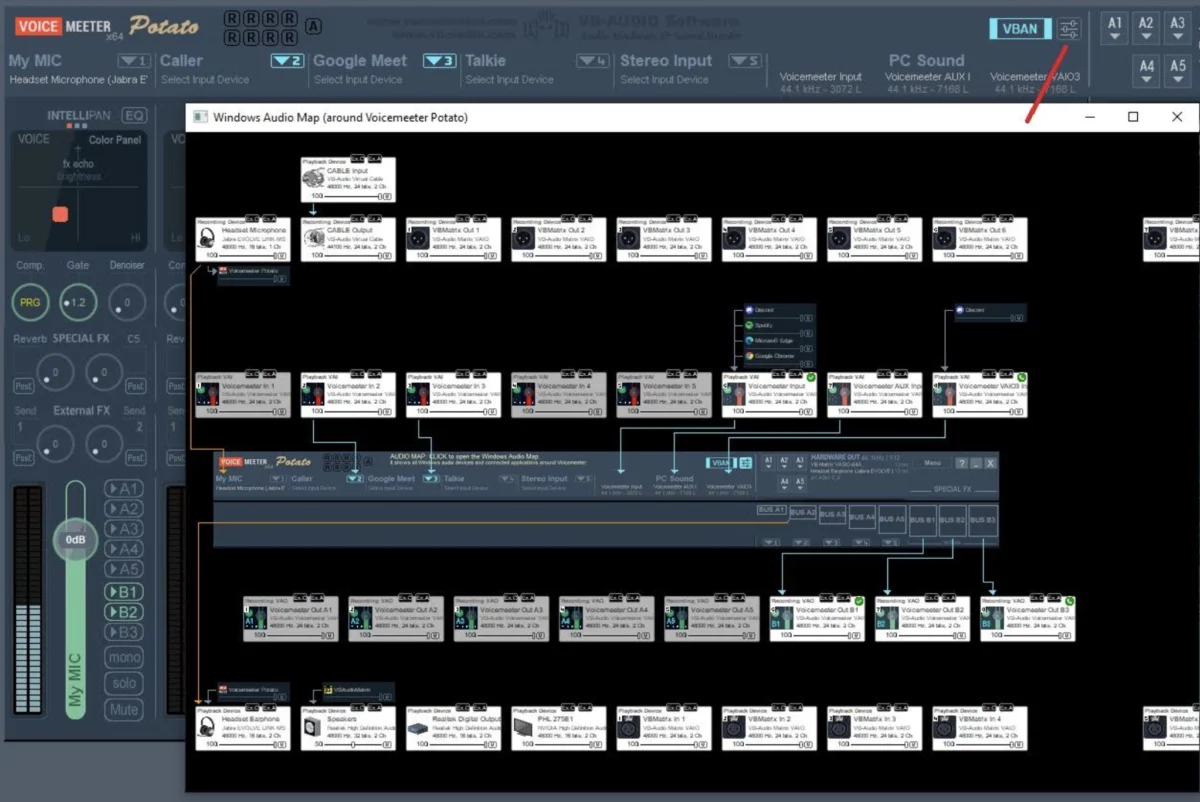
At the forefront of this release is the Windows Audio Map, a sophisticated, real-time visual overview of the entire Windows audio topology. Alongside this breakthrough diagnostic tool, the update delivers:
- A multichannel mode selector tailored for virtual inputs, granting unprecedented routing flexibility.
- Advanced limiter features, specifically introducing the new Yellow and Green Limiters for both strips and buses.
- A dedicated Sub-Mix View designed to streamline complex monitoring and sub-routing setups.
- Expanded capabilities within the VBAN protocol, including the newly introduced VBAN-Screen protocol for local network video and screen mirroring.
By bridging the gap between hardware-style digital signal processing (DSP) and software-based routing, VB-Audio continues to cement Voicemeeter’s status as an indispensable audio management layer for Windows environments.
Chronology: Ten Years of Evolution from Simple Utility to Audio Layer
To understand the weight of this milestone update, it is necessary to examine the trajectory of Voicemeeter since its inception.
2014–2016: The Inception and Early Adoption
When VB-Audio first introduced Voicemeeter to the public in 2014, the Windows audio landscape was heavily fragmented. Content creators, gamers, and podcasters struggled to route audio between hardware microphones, VoIP applications like Skype, and digital audio workstations (DAWs) without dealing with massive latency or glitchy virtual cable drivers. Voicemeeter arrived as a straightforward, donationware virtual audio mixer that allowed users to mix and manage audio sources on a single machine. Its immediate success caught the developers by surprise, prompting a rapid series of patches and the eventual introduction of Voicemeeter Banana and Voicemeeter Potato, which scaled the platform from a basic stereo router into a comprehensive multichannel processing powerhouse.
2017–2020: The VBAN Revolution and Networked Audio
As the streaming boom accelerated through the late 2010s, VB-Audio expanded Voicemeeter’s utility beyond a single PC. The introduction of the VBAN (Virtual Audio Network) protocol marked a massive turning point. Utilizing a lightweight UDP-based structure, VBAN allowed users to stream uncompressed multi-channel audio across local area networks (LANs) with near-zero latency. This era transformed Voicemeeter from a local utility into a core component of multi-computer streaming rigs, podcast studios, and broadcast setups.

2021–2025: Expanding the Ecosystem via SDKs and Remote APIs
Entering the 2020s, VB-Audio focused heavily on integration. By opening up the Voicemeeter Remote API and the VB-Audio Callback API, the company empowered third-party developers, hardware manufacturers, and DIY hobbyists. The platform quickly integrated with Elgato Stream Decks, custom touch interfaces, web-based dashboards, and hardware control surfaces. Software engineers began writing custom DSP modules—ranging from AI-based noise reduction to complex mastering chains—that plugged directly into the Voicemeeter architecture.
2026: The 10-Year Anniversary Update
Culminating over a decade of user requests, bug tracking, and architectural refinements, the September 2026 update introduces deep system-level visibility via the Windows Audio Map, addressing the age-old struggle of untangling Windows’ opaque sound settings.
Supporting Data & Deep Dive: Under the Hood of the New Features
The sheer scale of this anniversary update goes far beyond cosmetic interface tweaks. A granular look at the core additions reveals tools built specifically to solve persistent production bottlenecks.
1. The Windows Audio Map
For years, one of the greatest pain points for Windows power users has been the operating system’s fragmented audio architecture. Between legacy MME drivers, standard DirectSound, high-performance WASAPI (Shared/Exclusive), and professional ASIO drivers, tracking down where a signal is breaking or routing incorrectly has always been a chore.
The new Windows Audio Map acts as a visual diagnostic dashboard. It systematically displays:
- Active Windows audio devices and background applications.
- Real-time audio formats, sample rates, and bit depths.
- Active routing paths showing precisely how Windows communicates with Voicemeeter’s virtual inputs and physical hardware.
This visual transparency drastically reduces troubleshooting time, allowing live broadcasters and studio engineers to instantly diagnose sample-rate mismatches or misrouted application streams.
2. Firmware-Like DSP Approach: Yellow and Green Limiters
Continuing Voicemeeter’s tradition of mimicking high-end hardware signal processing, this update introduces sophisticated new limiter architectures across individual strips and output buses. Dubbed the Yellow and Green Limiters, these algorithms give users tighter transient control and peak management. Whether preventing digital clipping during an enthusiastic shout on a live stream or smoothing out dynamic vocal spikes in a podcast recording, these limiters operate with the transparent efficiency typically reserved for dedicated rackmount hardware.

3. Multichannel Mode Selector & Sub-Mix View
Complex routing often results in cluttered interfaces and accidental feedback loops. The new multichannel mode selector for virtual inputs gives users granular control over how multi-channel streams (such as 5.1 or 7.1 surround gaming audio) are downmixed or distributed across Voicemeeter’s strips.
Complemented by the new Sub-Mix View, users can now isolate specific groups of channels to build custom monitor mixes, headphone feeds, or separate sub-stems for recording software without disrupting the main master output.
4. VBAN-Screen: Beyond Audio to Networked Video
While VBAN is universally recognized for its prowess in handling Audio, Text, and MIDI streams over UDP, the 2026 update expands its mandate into visual territory. The newly introduced Frame protocol allows Voicemeeter to capture a screen region and transmit it across a local network to the VBAN-Screen application. This turns the ecosystem into a unified AV-over-IP tool, making local screen mirroring, multi-monitor broadcast monitoring, and remote production workflows seamless without relying on heavy, resource-intensive streaming software.
Ecosystem Integration: APIs, SDKs, and Developer Support
A major reason for Voicemeeter’s enduring decade-long dominance is its open approach to third-party integration. The software is no longer viewed merely as a standalone application, but as an operating-system-level audio framework.
The Remote API for Hardware Control
The Voicemeeter Remote API has served as the backbone for custom production control layers for years. Developers and creators have leveraged this interface to build:
- Dedicated Stream Deck plugins for instantaneous mute, volume, and routing control.
- Custom iPad and Android touch-surface dashboards using apps like Touch Portal or Companion.
- Automation scripts for live production environments that dynamically alter audio profiles based on triggers.
The VB-Audio SDK and Callback API
For software engineers and digital signal processing developers, the Voicemeeter SDK provides low-level access to the VB-Audio Callback API. This allows external applications to hook directly into Voicemeeter’s audio streams for real-time processing. Developers can engineer custom noise-reduction modules, spectral analyzers, voice-morphing AI filters, and mastering chains that execute in real-time, effectively allowing third-party developers to write their own VST-style plugins specifically tailored to the Voicemeeter pipeline.
Implications: What This Means for the Audio and Broadcasting Industry
The release of Voicemeeter’s 10-year anniversary update carries significant implications for several distinct sectors of the digital audio market.

1. For Content Creators and Streamers
The streaming community has long relied on Voicemeeter to separate game audio, Discord chats, microphone inputs, and media alerts into distinct tracks for OBS Studio. The introduction of the Windows Audio Map and the Sub-Mix View removes much of the historical learning curve associated with setting up virtual audio paths. Streamers can now visually verify that their secondary audio sources are routing correctly, drastically minimizing technical difficulties mid-broadcast.
2. For Podcasters and Remote Interviewers
With complex multi-app workflows—such as running local recording software, digital audio workstations, and VoIP platforms simultaneously—podcasters frequently encounter driver conflicts. The enhanced limiter options and precise multichannel input selectors give remote and hybrid podcasters broadcast-ready dynamic control right out of the box, bridging the gap between consumer ease-of-use and professional studio polish.
3. For Software Developers and Hardware Manufacturers
By continually refining its SDK and API architecture, VB-Audio ensures that hardware manufacturers (such as MIDI controller makers and stream deck developers) and independent DSP software houses have a stable, low-latency platform to build upon. The ability to push video streams via the new VBAN Frame protocol also hints at a broader future where VB-Audio’s networking protocols could influence light-weight AV transport standards outside of traditional audio circles.
Conclusion
As VB-Audio Software looks past its first ten years of development, this anniversary update proves that the company is not resting on its laurels. By combining deep system-level diagnostics with the Windows Audio Map, expanding professional dynamics processing via the Yellow and Green Limiters, and pushing VBAN into the realm of video transmission, Voicemeeter remains the undisputed king of virtual audio routing on the Windows platform.
For engineers, streamers, and creators alike, this update is a testament to what can be achieved when a development team listens closely to its user base for a full decade.
To learn more about the update, access technical documentation, or download the latest version, visit the official VB-Audio Software website.