In the modern digital workspace, the friction of context-switching is a silent killer of productivity. Between the fragmented keyboard shortcuts of Zoom, Microsoft Teams, and Google Meet, and the repetitive manual tasks inherent in spreadsheet management or coding, professionals often find themselves lost in a maze of key combinations. For many, the mental load of remembering that Command+Shift+A mutes a mic in one app but triggers a different function in another is a persistent irritant.
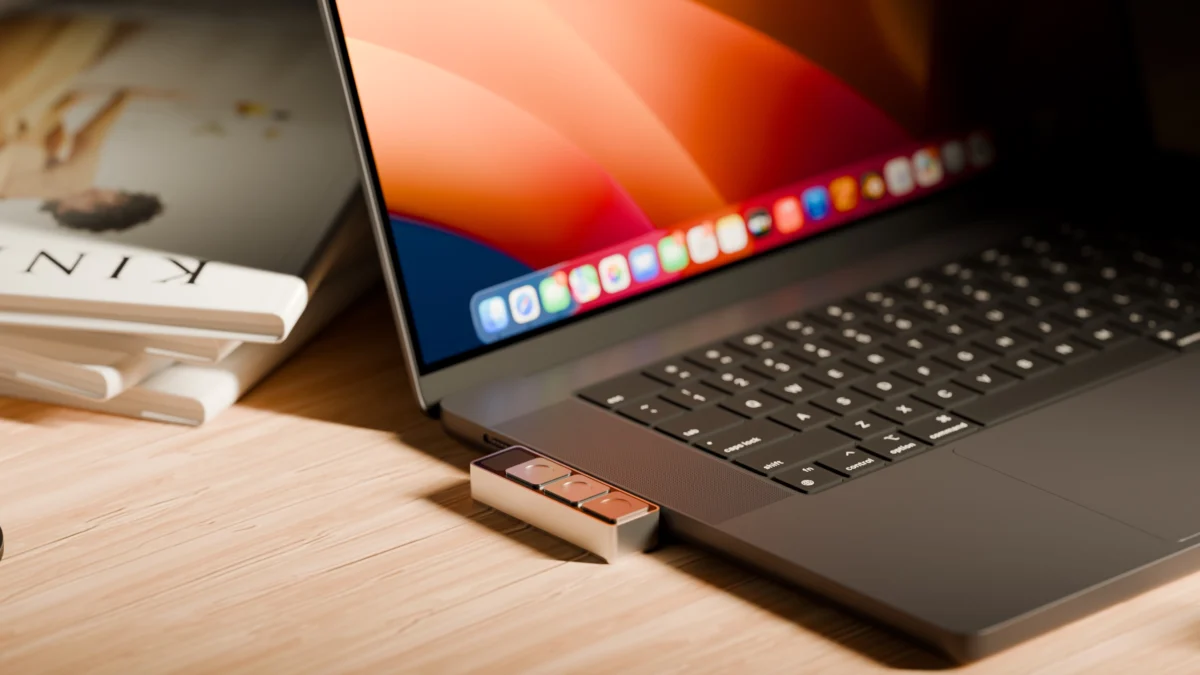
Enter Project Mirage’s Dune, a hardware solution designed to reclaim that lost time. Roughly the size of a stick of chewing gum, this three-key aluminum keypad aims to provide a universal, physical interface for the software-heavy lives of MacBook users. By mapping dynamic, context-aware commands to a dedicated peripheral, Project Mirage is betting that users are ready to pay a premium to simplify their desktop navigation.
The Core Concept: Hardware as a Contextual Layer
At its heart, the Dune is a minimalist, three-button input device that plugs directly into a MacBook’s USB-C port. Priced at $119 (with an eventual MSRP of $149), the device is more than just a macro pad; it is an intelligent extension of the macOS ecosystem.
The genius—and the core utility—of the device lies in its context-aware software. When a user opens a meeting platform, the three buttons might default to "Mute Microphone," "Toggle Camera," and "Bring Window to Front." When the user switches to Excel or Google Sheets, those same buttons instantly remap to "Copy," "Paste," and "Undo." For software developers working in VS Code or GitHub, the buttons can be programmed to perform complex actions like merging pull requests or closing tickets with a single tap.
Unlike traditional macro pads that require clunky, manual profile switching, Dune utilizes the companion app to monitor the active window, effectively changing the device’s "personality" in real-time as the user moves through their digital workspace.
Chronology and Development
The journey of Project Mirage began with the identification of a specific "pain point" common among high-velocity professionals: the lack of a standardized, tactile interface for virtual communication.
- Design Phase: The startup focused on a bespoke manufacturing process. Each unit is built to match the specific dimensions of the user’s MacBook model, ensuring a flush, aesthetic fit that minimizes the "dongle-heavy" look often associated with premium Apple peripherals.
- Software Integration: Recognizing that hardware is only as good as its software, the team prioritized the development of an intuitive companion app. This app serves as the bridge, allowing users to define system-wide or app-specific shortcuts.
- The AI Pivot: In a move that distinguishes it from competitors like the Elgato Stream Deck, Project Mirage integrated Claude Desktop. This allows users to describe their desired shortcuts in plain, natural language, removing the technical barrier of coding for those who wish to create custom automation.
- Current Availability: As of mid-2026, the device supports M2 Air or later and M1 Pro or later models of MacBook, provided they are running macOS 15 Sequoia or newer.
Supporting Data and Technical Specifications
The technical appeal of the Dune is rooted in its simplicity and integration. It is a bus-powered device, meaning it draws all necessary electricity directly from the MacBook. There are no batteries to charge, no Bluetooth latency to troubleshoot, and no external power supplies required.
Hardware Breakdown
- Form Factor: Aluminum chassis, approximately the size of a stick of gum.
- Connectivity: USB-C (Direct port connection or via dongle).
- Inputs: Three programmable physical keys.
- Compatibility: Optimized for high-end Apple Silicon (M-series) MacBooks.
- Software Ecosystem: A proprietary companion app with a burgeoning marketplace for "skills" (pre-programmed macros).
The AI-Driven Customization Layer
The integration of Claude Desktop is perhaps the most significant differentiator. By utilizing Large Language Models (LLMs), users can bypass the traditional "macro-coding" interface. For example, one could request, "Create a shortcut that identifies the current website, scrapes the company’s investor profile, and summarizes it." The LLM writes the Python script, assigns it to a key, and maintains the logic—all without the user needing to touch a line of code.
User Experience and Critical Observations
While the Dune hardware is undeniably sleek, the user experience is not without its hurdles. During initial testing, the most prominent issue was the sensitivity of the keys.

The Resistance Problem
The keys, while satisfying to look at, lack sufficient tactile resistance. In a fast-paced work environment, accidental inputs are a legitimate risk. Users have reported instances of "pocket-dialing" their own camera or microphone because their hand brushed the device while reaching for a beverage. For a tool meant to provide control, accidental activation represents a significant design flaw that likely requires a hardware revision in future iterations.
The Learning Curve and Marketplace Limitations
The companion app’s marketplace, which allows users to share and download "skills," is currently thin. A primary frustration is the inability to test a skill in a "sandbox" environment before committing it to a physical button. Users are currently forced to "assign and pray," which can lead to unnecessary frustration if a script fails or behaves unexpectedly.
Strategic Implications: The Future of Peripheral Computing
Project Mirage is positioning the Dune as the "thin front end" for an AI-powered skills ecosystem. By creating a marketplace where users can trade, sell, or share complex automation, the startup is attempting to build a moat around their hardware.
If the marketplace grows, the Dune becomes more than a $119 piece of metal; it becomes a gateway to a community-driven repository of efficiency tools. For developers, founders, and investors—individuals whose time is measured in high-stakes decisions—the value proposition is clear: the faster one can navigate a computer, the faster one can produce results.
Comparison to Incumbents
The market for productivity hardware is not empty. The MuteMe device offers a specialized, single-purpose solution for meeting management, while the Elgato Stream Deck remains the titan of business-focused macro control. However, the Dune occupies a unique niche. It is more compact than a Stream Deck and more versatile than a MuteMe. Its success will ultimately depend on whether the startup can resolve its hardware sensitivity issues and scale its software ecosystem before the major peripheral manufacturers decide to replicate the "tiny, flush-mounted macro pad" form factor.
Conclusion: A Tool for the Power User
The Dune by Project Mirage is an ambitious piece of hardware that addresses a very real, very modern problem: the "keyboard clutter" of professional life. While it suffers from early-stage growing pains—specifically regarding the tactile resistance of its buttons and the maturity of its software marketplace—it offers a glimpse into a more seamless future.
For those who spend their days toggling between browser tabs, code editors, and meeting software, the Dune is a compelling productivity upgrade. It is a reminder that in the age of AI, the most effective tools aren’t just the ones that make us smarter, but the ones that make us faster. As the startup continues to iterate on its firmware and expand its skill library, the Dune could well evolve from a niche gadget into an essential component of the modern professional’s desk setup.
Disclaimer: When you purchase through links in our articles, we may earn a small commission. This doesn’t affect our editorial independence.