October 2026 — In the high-pressure environments of modern post-production houses, broadcast suites, and music mixing studios, time is arguably the most valuable commodity. For decades, audio professionals relying on Avid’s industry-standard Pro Tools have accepted a tedious, momentum-killing workflow bottleneck: the necessity of closing an active project, launching a legacy session file, hunting for an alternate take, sound effect, or mix element, and then reopening the current project just to retrieve a single piece of audio.
Enter Sparks Audio, an innovative software developer that has officially launched ClipMap, a powerful new stand-alone utility engineered specifically to dismantle this workflow barrier. Designed to let audio engineers, music producers, editors, and sound designers browse, preview, and extract material from multiple Pro Tools sessions without ever closing their active projects, ClipMap promises to redefine efficiency in audio post-production.
Main Facts: What is ClipMap?
At its core, ClipMap is a cross-platform application (available for both macOS—supporting Apple Silicon and Intel architectures—and Windows) that reads .ptx files natively and directly. Crucially, the application operates entirely independently of Pro Tools, meaning users do not even need to have Pro Tools installed on their machines to browse, analyze, and extract data from a session file.
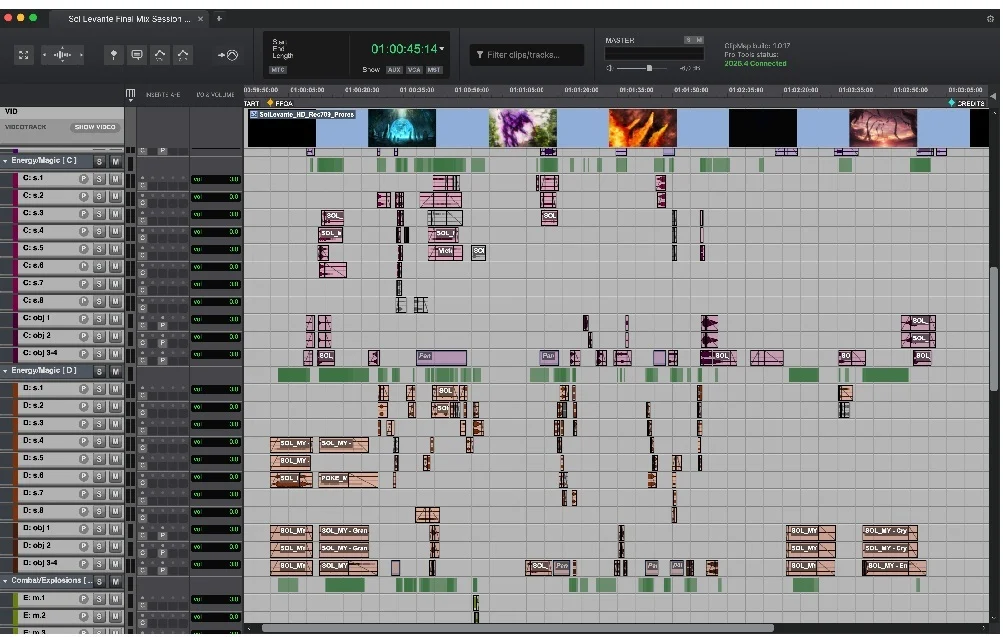
Operating in a read-only mode to safeguard the integrity of original session files, ClipMap introduces a browser-style tabbed interface. This allows users to open multiple .ptx files simultaneously. Features of the standard and Pro versions include:
- Direct Multi-Session Browsing: Open several Pro Tools sessions side-by-side in tabs to compare different mix revisions, locate stray audio files, or pull alternate takes instantly.
- Intelligent Search Capabilities: Users can search dynamically through clip names, memory locations, and even transcribed dialogue, with matching search criteria instantly highlighted along the visual timeline.
- Advanced Playback Controls: Standard playback features include comprehensive solo and mute capabilities. The Pro tier elevates this further by introducing synchronized video playback, clip gain visualization, volume automation mapping, and detailed session plugin manifests.
- Seamless Drag-and-Drop Workflow: Audio can be dragged directly from the ClipMap browser straight into an active Pro Tools timeline (or any other DAW).
- Precision Spotting (Pro Version): ClipMap Pro supports advanced clip spotting with intelligent track mapping, ensuring that transferred assets retain vital metadata and attributes such as fades, clip gain, volume automation, and panning.
- Frictionless Licensing: Eschewing the industry trend toward cumbersome security dongles and recurring financial subscription models, ClipMap operates cleanly without requiring an iLok or ongoing payments.
Chronology: The Evolution of the Pro Tools Workflow Dilemma
To understand the significance of ClipMap, one must look at the historical trajectory of digital audio workstation (DAW) development over the past thirty years.
The Legacy of Single-Session Limitations
Since the dawn of native and DSP-based digital audio editing, session files have traditionally acted as isolated silos. A Pro Tools .ptx (and legacy .pts or .sess) file is a complex database containing references to audio files, edit decisions, automation curves, plugin assignments, and routing matrices.
Historically, DAWs were engineered around the assumption that an engineer would only ever work on one session at a time. While this architecture ensured maximum system resource allocation for heavy audio processing and DSP mixing, it created an unintended operational trap: data isolation.

The Post-Production Grind
As television, film, and interactive media expanded in complexity—frequently involving hundreds of episodes, shifting scene revisions, and massive sound effects libraries—audio editors found themselves routinely referencing historical sessions from earlier episodes or alternate mix passes.
The traditional workflow required a painstaking sequence:
- Save and close the current active project (often taking 30 seconds to several minutes depending on plug-in instantiation and asset loading).
- Locate and launch the older
.ptxfile. - Search through sprawling clip lists or untagged timelines to find the required sound.
- Export the audio file or bounce the selection.
- Close the archive session, reopen the current project, and import the asset.
For a senior sound designer or dialogue editor working under tight television broadcast deadlines, this repetitive cycle could occur dozens of times a day, easily bleeding away hours of productive studio time every single week.
The Development and Arrival of ClipMap
Recognizing this systemic inefficiency, Sparks Audio began developing a lightweight, hyper-focused utility capable of parsing the proprietary Pro Tools session structure externally. By bypassing the heavy initialization routines of the full Pro Tools application, Sparks Audio succeeded in building a tool that launches instantly, parses .ptx databases in milliseconds, and bridges the gap between archived sessions and active creative timelines. Released in October 2026, ClipMap represents the culmination of years of workflow observations in high-end post-production facilities.
Supporting Data & Technical Architecture
While third-party utility applications are common in the software plugin ecosystem, building a parser that accurately reads modern Pro Tools .ptx session files without running the parent software is a formidable technical achievement.
Performance Metrics and Resource Efficiency
Because ClipMap is designed as a lightweight, stand-alone utility rather than a resource-heavy DAW host, its system footprint is remarkably small. On Apple Silicon systems (M-series processors) and modern multi-core Windows PCs, the application launches nearly instantaneously.
- Memory Management: Unlike running multiple instances of Pro Tools via background helper applications—which would quickly overwhelm system RAM and CPU caches—ClipMap loads session data into a streamlined metadata browser.
- Read-Only Safety: Operating strictly in read-only mode, ClipMap ensures that users can never accidentally overwrite, corrupt, or alter historical project files while searching for assets. The original
.ptxfiles remain pristine.
Feature Breakdown: Standard vs. Pro Tier
Sparks Audio has structured ClipMap into two accessibility tiers to serve different segments of the audio industry:

| Feature | ClipMap (Standard) | ClipMap Pro |
|---|---|---|
Native .ptx File Reading |
Yes | Yes |
| Tabbed Multi-Session Browsing | Yes | Yes |
| Basic Playback (Solo/Mute) | Yes | Yes |
| Clip Name & Memory Location Search | Yes | Yes |
| Transcribed Dialogue Search | Yes | Yes |
| Direct Drag-and-Drop to Timeline | Yes | Yes |
| Synchronized Video Playback | No | Yes |
| Clip Gain & Volume Automation View | No | Yes |
| Session Plugin Information & Manifests | No | Yes |
| Advanced Track Mapping & Spotting | No | Yes |
The inclusion of transcribed dialogue search is a particularly powerful feature for modern documentary and narrative television editors, allowing dialogue search terms to bridge the gap between spoken word and visual timeline cues across multiple historical project files simultaneously.
Official Responses and Industry Reception
The industry response to ClipMap’s release has been overwhelmingly enthusiastic, particularly among high-end professionals working in television and film post-production where time-to-delivery metrics are uncompromising.
Sofia T., a veteran TV and film sound editor, highlighted the sheer volume of lost time the utility recovers:
"In TV and film post-production, speed is everything. We used to lose hours every week just closing, opening, and digging through old episode sessions. Having an external utility that lets us browse those archives instantly changes the entire pacing of our workday."
Eric T., a prominent sound designer, emphasized how the application integrates directly into his daily creative output:
"Being able to pull up multiple
.ptxfiles in ClipMap and spot clips directly into my active timeline in seconds has completely transformed my daily output. It eliminates all the administrative friction of audio retrieval."
Perhaps the most candid assessment came from senior audio engineer Paul A., who pointed out a long-standing vacuum in the software market:

"You don’t realize how much time you lose switching between sessions until that bottleneck is gone. It’s a massive time-saver that quickly becomes second nature—and honestly, something Avid should have addressed a long time ago."
Implications for the Future of Audio Workflows
The launch of ClipMap by Sparks Audio carries broader implications for the audio software ecosystem and highlights shifting expectations among professional users.
1. The Rise of Micro-Utilities
For years, software manufacturers have tended toward massive, all-in-one software suites or sprawling subscription ecosystems. ClipMap proves that there is a thriving market for targeted, highly specialized "micro-utilities"—software engineered to solve one specific, deeply annoying workflow problem with absolute perfection. By remaining affordable, licensing-friendly (no iLok required), and lightning-fast, ClipMap sets a new standard for workflow augmentation tools.
2. Pressure on Legacy Developers
As Paul A.’s commentary suggests, third-party developers are increasingly stepping in to solve foundational workflow gaps that major DAW manufacturers have historically overlooked. While Avid continues to introduce powerful feature updates to Pro Tools itself (such as advanced cloud collaboration and native ARA 2 integration), the auxiliary management of legacy project archives has remained an unaddressed pain point. Tools like ClipMap put pressure on major developers to either build native asset-browsing solutions or embrace open ecosystem interoperability.
3. Accelerated Post-Production Timelines
In practical terms, the widespread adoption of ClipMap across post-production facilities will likely compress project turnaround times. When assistant editors, sound editors, and re-recording mixers can pull source materials, alternate takes, and reference audio from previous project iterations in a matter of seconds rather than minutes, creative momentum is preserved. In the creative arts, protecting that flow state is often the difference between a good mix and a brilliant one.
Availability
ClipMap is available immediately from the official Sparks Audio website for macOS (optimized for both Apple Silicon and Intel hardware) and Windows operating systems.