For subscribers of Sky Glass and Sky Stream, a major upgrade to the entertainment viewing experience is on the horizon. Sky is preparing to roll out a comprehensive, ground-up redesign of Sky OS—the proprietary operating system that powers both its dedicated television hardware and the Sky Go mobile and desktop application.
Designed to make browsing more intuitive, lightning-fast, and deeply tailored to individual user preferences, the upcoming update borrows design philosophies from industry heavyweights while introducing powerful new features. Though the software is currently restricted to a closed customer trial, Sky has confirmed that the public rollout will take place across all compatible devices by the end of the year.
Following an exclusive hands-on preview at Sky’s corporate headquarters, industry analysts and media have broken down the most significant upgrades heading to living rooms nationwide.
Main Facts: What’s Changing in Sky OS?
The upcoming software refresh is more than a superficial coat of paint; it represents a structural reorganization of how users interact with live television, streaming apps, on-demand content, and personal libraries.
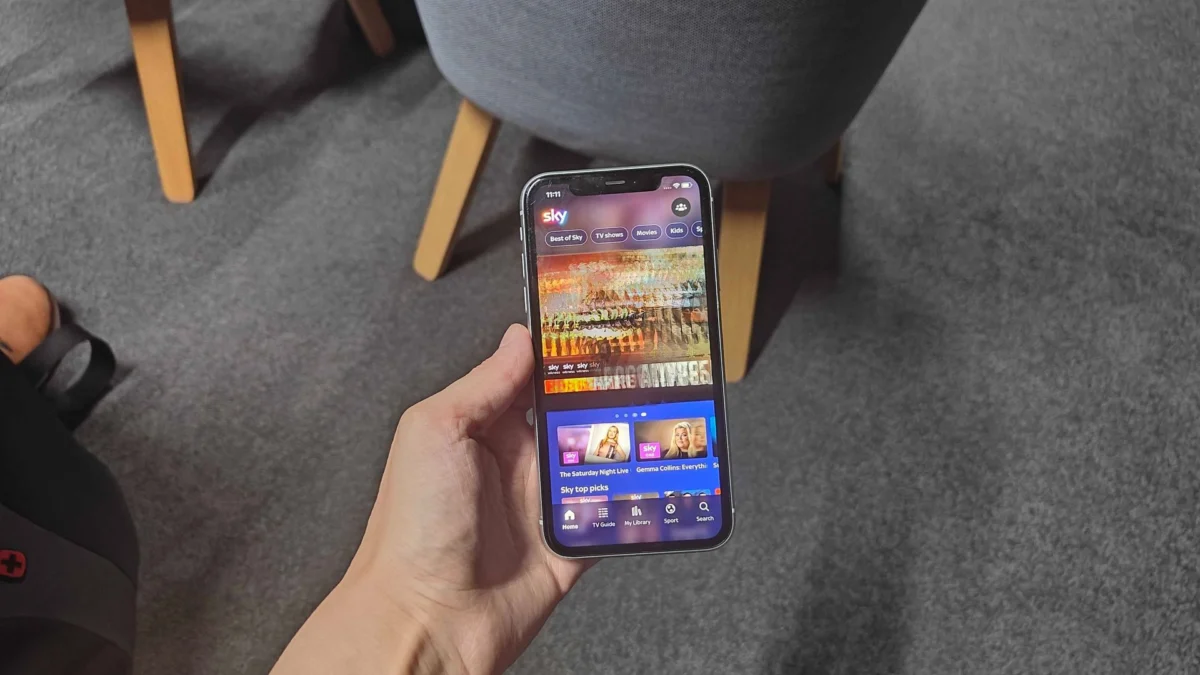
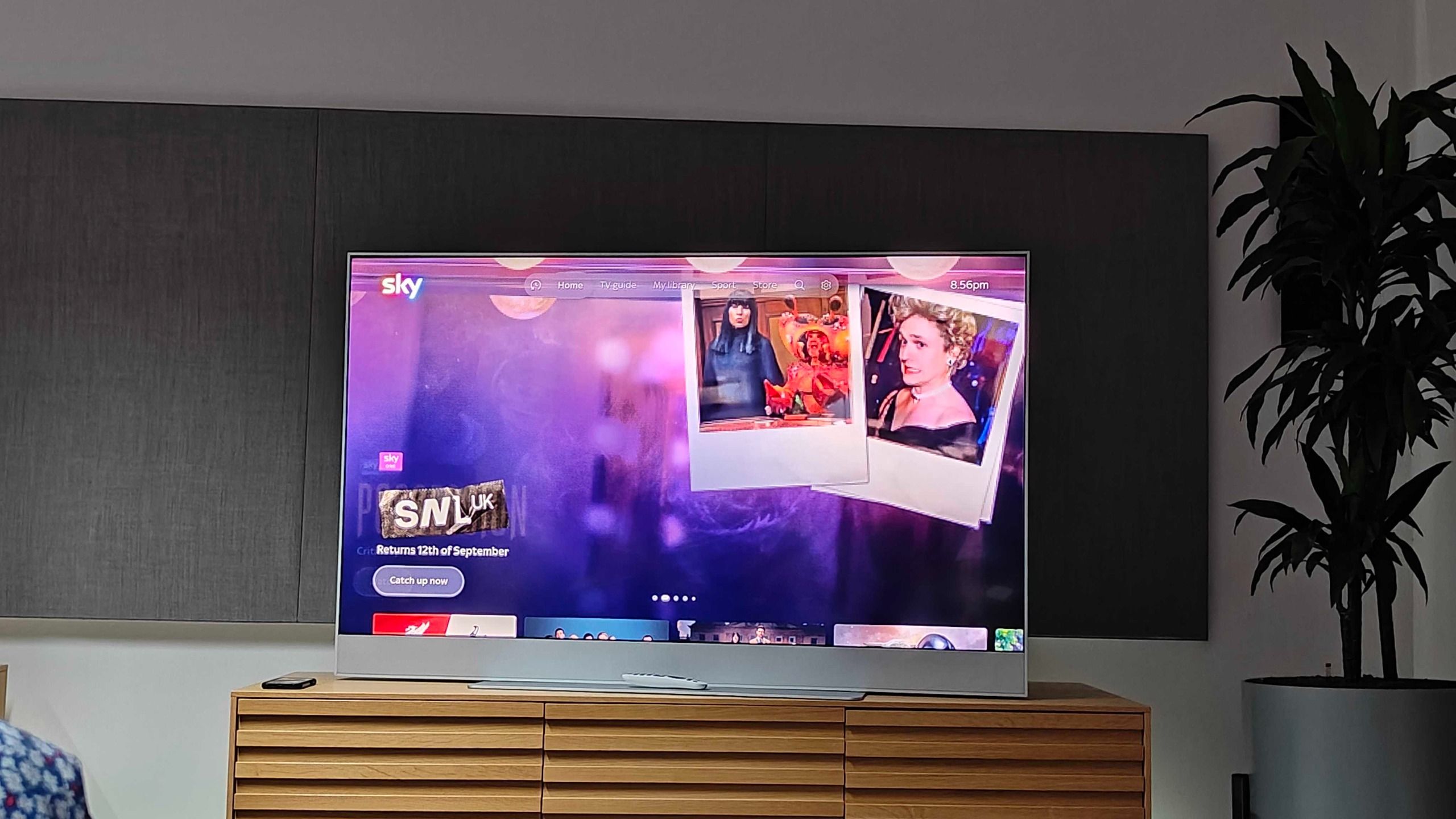
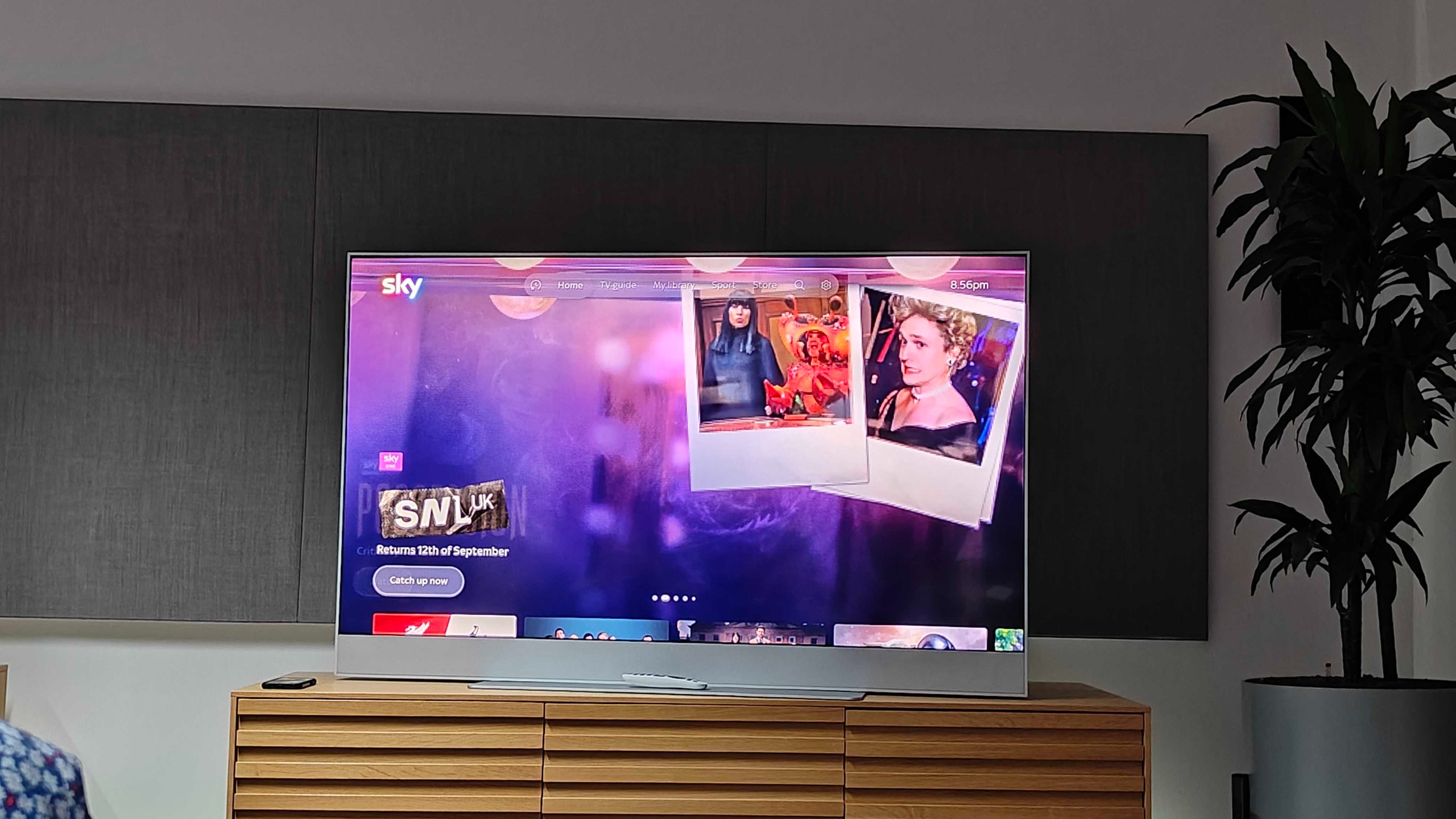
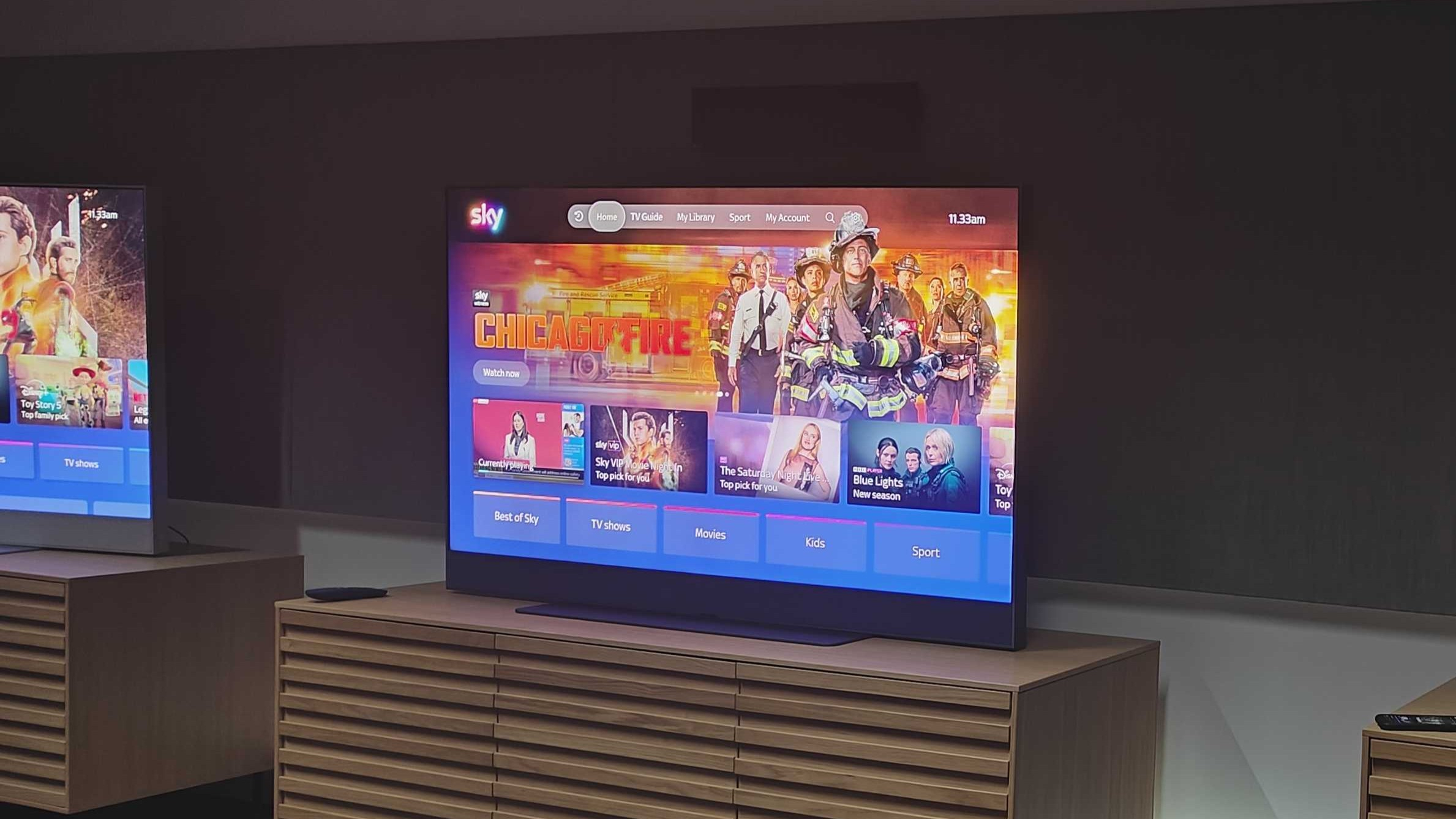
- The Top-Level Navigation Bar: Abandoning the older layout style, Sky OS introduces a streamlined, persistent menu bar across the top of the interface. Strongly reminiscent of Apple’s clean design language, the bar provides instant access to core hubs: Home, TV Guide, My Library, Sport, and My Account.
- The "Recents" Shortcut: Situated on the far-left corner of the navigation bar, this temporary working-title section gives immediate access to ongoing content, saved favorites, and recently launched channels without requiring users to scroll endlessly through the main home screen.
- Refined Channel Branding: The traditional, text-heavy electronic programme guide (EPG) has been overhauled. Channels are now prominently identified by their official network logos, drastically improving visual recognition and accelerating navigation.
- "My Library" Integration: Replacing the legacy "Playlist" nomenclature, My Library serves as a unified vault for watchlists, bookmarks, and cloud recordings.
- Expanded Cloud Recording: Sky is placing a heavier emphasis on recording capabilities, offering users up to 1,000 hours of cloud storage capacity—roughly equivalent to 500 days of continuous playback.
- Conversational AI Voice Search: The platform’s voice assistant has been supercharged with natural-language processing, allowing users to ask complex, multi-layered questions and pull external trivia directly into the interface.
Chronology of the Update: From Concept to Rollout
Understanding how Sky OS evolved to this point highlights the company’s ongoing efforts to compete in an increasingly crowded streaming ecosystem dominated by Roku, Amazon Fire TV, Apple TV, and Google TV.
The Shift Away from Traditional Satellite
When Sky launched Sky Glass—its hardware-agnostic, internet-delivered television set—followed closely by the standalone Sky Stream puck, the company took a monumental gamble. By moving away from traditional satellite dishes and moving entirely to broadband delivery, Sky needed an operating system capable of harmonizing linear broadcast television with fragmented on-demand streaming apps like Netflix, Disney+, and Amazon Prime Video.
The first iteration of Sky OS succeeded in unifying these sources under a single interface, but users frequently criticized the software for being overly cluttered, prone to sluggish loading times, and overly reliant on automated recommendations that buried user-preferred content.
Development and Internal Trials
Recognizing the friction points in the user experience, Sky’s software engineering teams spent the past year architecting a complete front-end and back-end overhaul. The primary goal was to reduce the number of "clicks" required to reach desired content and to create a unified experience that transitions seamlessly between the big-screen television experience and the Sky Go mobile app.
The Current Trial Phase
As of late 2023, the updated operating system has transitioned from internal developer sandboxes into a live customer trial phase. A select group of everyday Sky Glass and Sky Stream users are currently stress-testing the new build in real-world home environments.
The End-of-Year Target
According to official company statements provided during the press preview, feedback from the closed customer trial will be used to iron out minor bugs and fine-tune performance metrics. The final, polished software package is scheduled for a wide public deployment arriving by the end of the calendar year, automatically updating compatible hardware overnight without requiring user intervention.
Supporting Data and Deep Dive: Feature Breakdown
To fully appreciate the scope of the Sky OS redesign, it helps to examine the functional mechanics of its three primary pillars: the redesigned navigation, the enhanced recording infrastructure, and the upgraded AI assistant.
1. Navigation and Content Discovery
The introduction of the top-level navigation bar fundamentally alters how users traverse the operating system. In previous iterations, finding sports pages, account settings, or live guides often meant scrolling down vertical stacks of tiles, frequently resulting in distraction or user fatigue.
- The Home Carousel: At the very top of the Home tab, a dynamic new carousel highlights curated movies and television shows. Hovering over or clicking a title instantly triggers an embedded, short-form trailer, giving viewers a rapid preview before committing to a full stream.
- Frictionless TV Guide Access: Selecting the TV Guide no longer forces users through intermediate picture-in-picture transition screens. The first click now launches directly into full-screen video playback alongside the interactive guide overlay, vastly speeding up channel surfing.
- Profile-Specific Curation: Every menu item within the navigation bar dynamically adjusts based on active user profiles, ensuring that personalized watchlists and recommendations remain front and center for every member of a household.
2. The Return and Evolution of Cloud Recording
While modern streaming services lean heavily into subscription-based, on-demand libraries, consumer research consistently shows that British television viewers maintain a strong affinity for traditional recording functions. Sky has responded by expanding and centralizing these capabilities.
- Granular Control: Users can set recordings directly from the TV guide with a single button press, choosing whether to record an individual episode, an entire series, or simply save the title to their digital watchlist. For sports enthusiasts, the system allows targeted recording of specific marquee events—such as an F1 Grand Prix race—without cluttering personal libraries with hours of unwanted practice and qualifying sessions.
- Massive Storage Capacity: The system supports up to 1,000 hours of storage. To put that into perspective, 1,000 hours equates to roughly 500 days of continuous playback of children’s programming like Peppa Pig. Users retain absolute control over their storage, with options to manually purge individual episodes or clear entire series with minimal effort.
- App-Level Exceptions: Certain broadcast partners—notably the BBC—utilize proprietary distribution frameworks that prevent direct cloud recording on third-party hardware. During demonstrations, attempting to record live BBC One broadcasts did not trigger a recording option. However, Sky has integrated deep linking partnerships that seamlessly route users to the standalone BBC iPlayer app to catch up on missed programming instantly.
3. The Conversational AI Assistant
Voice-activated remote controls have existed for years, but their utility has traditionally been limited to rigid, keyword-based searches (e.g., "Action movies," "Tom Cruise," or "BBC One"). Sky’s updated voice assistant introduces natural language processing, transforming the microphone button into an interactive conversational partner.
- Context-Aware Queries: Users can now speak to the remote conversationally. For example, asking the system to "Show me action movies that I haven’t watched yet" cross-references historical viewing data with available catalogs to generate precise, filtered results.
- External Knowledge Integration: Powered by structured data partnerships and external encyclopedic sources like Wikipedia, the assistant can answer follow-up queries about media assets. Asking "Has Castaway won any awards?" prompts the system to pull real-time trivia directly onto the screen.
- Strict Guardrails: To maintain its focus as an entertainment utility, Sky has intentionally built boundaries into the AI model. The assistant will politely decline or ignore prompts concerning real-world politics, general knowledge outside of film and television, or personal advice (such as what to cook for dinner).
- Visual Feedback: A vibrant, colorful animated wheel now illuminates on screen whenever the voice button is depressed, offering clear visual confirmation that the microphone is active and processing commands.
Official Responses and Industry Context
Sky’s leadership has framed the OS update as a vital evolution in home entertainment technology. In statements accompanying the media preview, product managers emphasized that consumer habits have shifted decisively toward hybrid consumption—a seamless blend of live broadcasting, time-shifted viewing, and subscription video-on-demand (SVOD).
"Viewers do not want to spend twenty minutes hunting through menus just to find something to watch on a Tuesday evening," noted a senior Sky product representative during the briefing. "Our goal with this redesign was to strip away the digital friction. By moving navigation to a persistent top bar, empowering our voice capabilities with natural intelligence, and making recordings feel native and immediate once again, we are giving control back to the viewer."
Industry analysts have praised the proactive approach. With smart TV manufacturers like Samsung, LG, and Roku aggressively pushing proprietary operating systems loaded with native advertising and sponsored tiles, hardware providers must continuously refine their user interfaces to retain subscriber loyalty. By positioning Sky Glass and Sky Stream as premium, frictionless lifestyle products, Sky aims to justify ongoing subscription costs in a hyper-competitive market.
Implications for Subscribers
For current and prospective Sky Glass and Sky Stream customers, the forthcoming software update carries several practical implications:
- A Steeper Learning Curve Upfront: While the new interface is objectively faster and cleaner, long-standing subscribers accustomed to the legacy tile layout will experience a brief adaptation period as they adjust to the top-level navigation bar and the repositioned My Library hub.
- Enhanced Multi-User Harmony: Because features like recordings, watchlists, and AI recommendations are strictly compartmentalized by profile, households with multiple family members will encounter significantly fewer crossed wires and unwanted recommendations cluttering their home feeds.
- Maximized Value from Hardware: For owners of Sky Glass televisions—who rely entirely on the integrated operating system rather than external set-top boxes—the performance enhancements promise a snappier, more responsive daily television experience.
- No Additional Cost: True to Sky’s software-as-a-service model, the comprehensive OS update will be deployed automatically and free of charge to all active Sky Glass and Sky Stream hardware units upon completion of the public rollout phase later this year.