
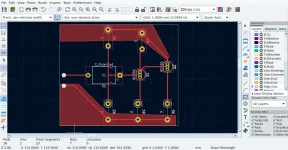
For generations, the "DIY audio" community has been defined by the tactile, often messy process of hand-building electronics. From breadboards held together by a tangle of jumper wires to home-etched circuit boards created with little more than copper-clad laminate and corrective fluid, the barrier to entry has traditionally been a mix of patience and manual dexterity. However, a recent discussion on the DIYAudio community forums highlights a significant shift: a collective migration toward professional-grade PCB design software, specifically KiCad, as hobbyists seek to elevate their projects from functional prototypes to polished, reproducible hardware.
The Catalyst: Moving Beyond "Corrective Fluid" PCBs
The discourse began with a candid admission from user edbarx, who noted that his current method of PCB fabrication—using correction fluid to mask copper before etching—was reaching its limitations. While this "lo-fi" approach allows for basic functionality, it lacks the precision, reliability, and ease of repair that modern standards demand.

"The prospect of having professional-looking PCBs is motivating me to have another look at KiCad," edbarx wrote. His goal is not merely aesthetic; it is rooted in the practical realities of long-term maintenance. As he pointed out, an unlabeled PCB is a "nightmare" to repair, akin to "groping in the dark in an unfamiliar place." By shifting to software-based design, hobbyists can generate silkscreen labels, clear component designations, and precise drill patterns, turning a "black box" circuit into a documented, maintainable piece of engineering.
Chronology of a Learning Journey
The thread quickly evolved into a masterclass in peer-to-peer technical mentorship. The exchange illustrates a common path taken by modern makers:

- June 17, 2026: The initial inquiry sparks a flurry of advice. Experienced users suggest that the steepest part of the learning curve is not the software interface itself, but the management of component libraries.
- Mid-Day, June 18, 2026: edbarx begins sharing his progress, posting designs for a simple two-transistor amplifier. These posts serve as a "real-time" lab, where veteran designers provide critiques on footprint selection, resistor orientation, and the importance of net-filling with copper.
- Late-Day, June 18, 2026: The conversation pivots toward advanced workflows. Participants debate the merits of custom libraries versus manufacturer-supplied ones, eventually settling on the "best practice" of building project-specific libraries.
Supporting Data: The "Big Three" Challenges
Through the collaborative process, the community identified three primary hurdles that define the early KiCad experience for beginners:
- Library Management: KiCad’s standard library is vast and overwhelming. For a newcomer, finding the correct component—and the matching footprint—can feel like searching for a needle in a digital haystack.
- Footprint Ambiguity: Deciphering the often-cryptic naming conventions for electronic footprints is a major point of friction. Without a standardized naming scheme, users often find themselves selecting parts that are physically incompatible with their physical components.
- Configurational Complexity: The sheer volume of settings, design rules, and output parameters creates a "paralysis by analysis" scenario.
The Role of Artificial Intelligence
Perhaps the most notable theme in this thread is the emergence of AI as a primary tutor. Long-time community members Bonsai and StevenCrook both emphasized that AI tools (such as ChatGPT and Claude) have revolutionized the way people learn KiCad. Instead of scouring outdated, multi-hour YouTube tutorials, users can now ask specific "how-to" questions that are contextualized to their current project. mcrushing provided a structured prompt strategy for beginners: defining their experience level, current project state, and specific desired outcomes, effectively using the AI as a "copilot."

Official Perspectives and Expert Commentary
While the aesthetic appeal of a clean board is an undeniable motivator for beginners, the more seasoned engineers in the thread, such as KSTR, offered a necessary reality check. "The electrons don’t care about looks," KSTR noted, pointing out that an aesthetically pleasing board can still be an electrical nightmare if the underlying signal integrity, thermal management, and return paths are poorly designed.
Tomchr, another experienced contributor, bridged the gap between these perspectives. He argued that while aesthetics should never overrule sound engineering, there is a symbiotic relationship between the two. "Neatly arranged parts make it easier to repair the circuit later," he explained. Furthermore, he noted that the process of aligning components and optimizing traces often forces the designer to think more deeply about the electrical path, which in turn leads to a better-performing circuit.

Implications: The Democratization of PCB Design
The shift toward KiCad signifies a broader trend in hobbyist electronics: the professionalization of the home lab. With the rise of affordable, high-quality PCB fabrication services—such as PCBWay and JLCPCB—the barrier to producing industrial-grade boards has never been lower.
The "Design for Repair" Philosophy
The thread highlights a shift toward "Design for Repair" (DfR). By utilizing software to create clear, labeled layouts, hobbyists are future-proofing their work. As edbarx noted, the difference between a hand-drawn, etched board and a professional CAD-designed board is the difference between a prototype and a product. This evolution allows hobbyists to share their designs with the community, knowing that another person can actually read the board and understand the circuitry.

The Future of Engineering Pedagogy
The reliance on AI for mastering complex CAD software suggests a change in how technical skills are acquired. By treating software as an iterative tool—where one learns by doing, supported by AI-assisted troubleshooting—users can skip the "introductory theory" phase and jump straight into productive design. The advice provided by mcrushing to include datasheet URLs directly within the KiCad component properties is a prime example of this professional-grade mindset being adopted at the hobbyist level.
Conclusion: The Path Forward
The DIYAudio thread serves as a microcosm of the modern engineering learning curve. It is no longer about learning in isolation or relying on archaic, manual fabrication techniques. It is about leveraging global knowledge bases, AI-driven guidance, and accessible manufacturing to push the boundaries of what a home-built device can be.

As bucks bunny eloquently put it, "At the very end, it is all physics." Whether one is drawn to KiCad for the sheer beauty of a perfectly routed copper plane or the cold, hard necessity of circuit performance, the result is the same: a more robust, informed, and capable community of engineers. The "steep" learning curve of KiCad is, for those who persevere, a gateway to a higher level of electronic craftsmanship. As users continue to share their designs and "peer-review" each other’s work, the collective knowledge of the community rises, ensuring that the next generation of DIY audio equipment will be as reliable as it is innovative.


